
Common Accessibility Issues in 2026: A Leadership Checklist for Inclusion
What if the greatest obstacle to your organization’s success isn’t a lack of vision, but a failure to see the digital walls you’ve unintentionally built? You likely believe that a diverse team is your strongest asset, yet the looming 2026 ADA compliance deadlines often feel like a moving target. Many leaders find themselves paralyzed by common accessibility issues that leave 27 percent of the American adult population unable to fully engage with their platforms. It’s a gap that creates a disconnected workforce and fosters a culture of uncertainty rather than trust.
I’ve learned that true leadership requires us to see beyond physical sight, a lesson I practiced while descending 78 flights of stairs in the North Tower on September 11, 2001. By reading this guide, you’ll gain a clear roadmap to identify and resolve these frequent barriers from my unique perspective as a blind professional. We’ll walk through a comprehensive checklist to audit your accessibility and transform your workplace culture into one of genuine interdependence and resilience. It’s time to build an unstoppable mindset that ensures no one is left behind in the dark.
Key Takeaways
- Shift your perspective from providing “help” to fostering empowerment by recognizing accessibility as a vital leadership responsibility rather than a compliance hurdle.
- Identify and dismantle common accessibility issues in your digital landscape by understanding how structured data creates a visible path for blind professionals.
- Master the nuances of physical space by implementing emergency egress strategies that ensure every member of your team can navigate to safety with confidence.
- Utilize a strategic checklist to audit your internal portals, documents, and physical signage, ensuring full participation across all corporate environments.
- Build a resilient, inclusive culture by adopting an “Unstoppable Mindset” that treats accessibility as a catalyst for universal problem-solving and innovation.
Defining Common Accessibility Issues as Leadership Gaps
Accessibility isn’t a checklist or a charitable act. It’s the intentional removal of barriers that prevent people from showing up as their full selves. When we develop a deeper understanding of accessibility, we’re really talking about a fundamental shift in how we perceive human potential. Many organizations treat common accessibility issues as technical glitches to be patched. This is a mistake. True leadership recognizes that accessibility is a strategic pillar of corporate accessibility.
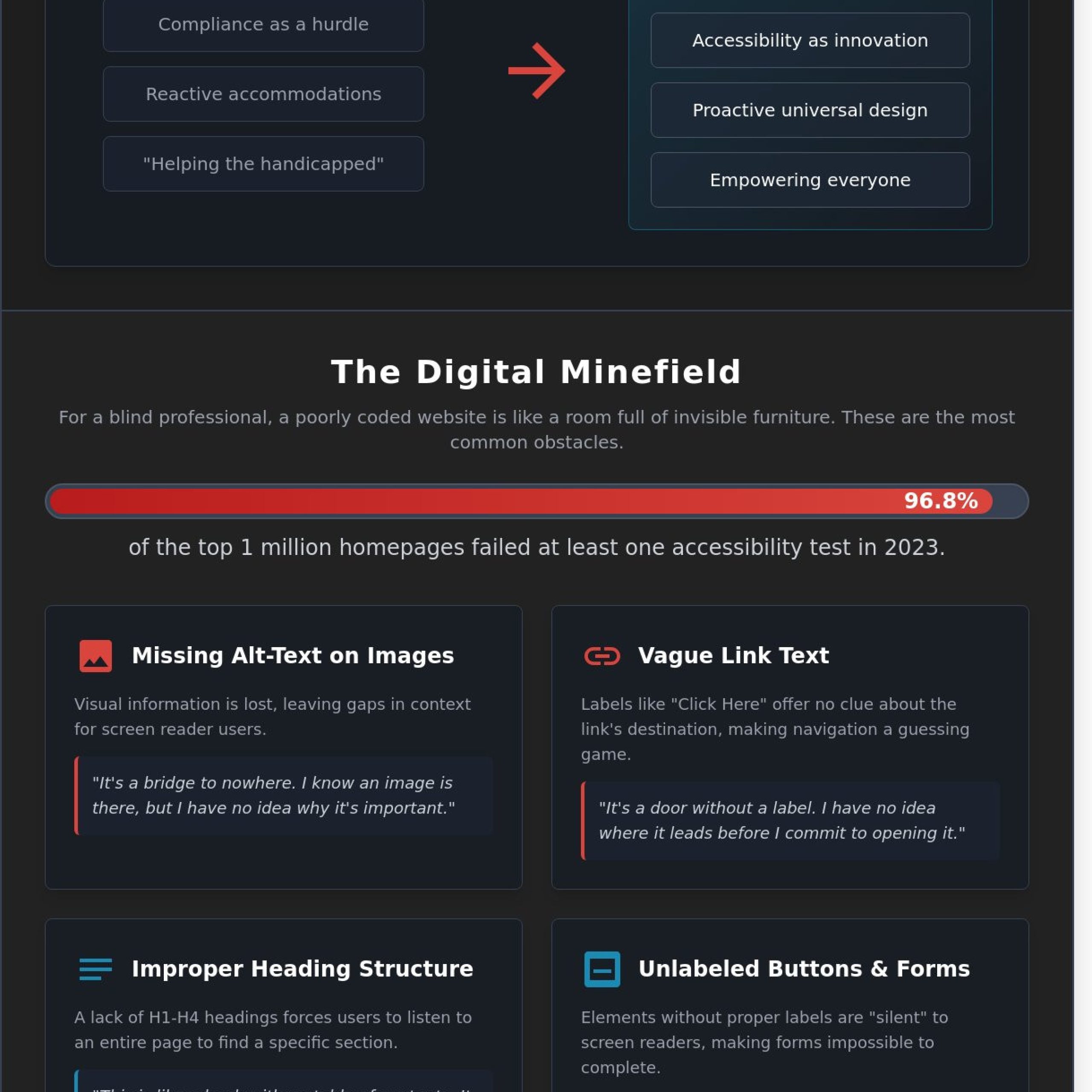
We must move away from the myth of total independence. In reality, we’re all part of a web of interdependence. Just as I relied on my guide dog, Roselle, to navigate 1,463 steps on September 11, every employee relies on tools to succeed. If those tools are broken, the leadership has failed to provide a clear path forward. We must stop viewing accessibility as “helping the handicapped.” Instead, we should see it as empowering the workforce to reach peak performance through an Unstoppable Mindset.
The Cost of Inaccessible Design
Legal risks go far beyond a courtroom. While website accessibility lawsuits rose to 2,387 cases in 2023, the damage to a brand’s reputation is often more permanent. Companies lose out on the “purple dollar,” a global market of people with disabilities and their families valued at $13 trillion. Exclusion isn’t a design flaw; it’s a profound failure of leadership vision that leaves talent in the dark. When we ignore these gaps, we tell the 27 percent of adults in the U.S. living with a disability that their contribution doesn’t matter.
Reactive Accommodations vs. Proactive Inclusion
Waiting for an employee to ask for help is a sign of a reactive culture. By the time a request is made, the barrier has already caused frustration and diminished trust. We should look to the “Curb-Cut Effect” as our guide. Originally designed for wheelchairs, sidewalk ramps now benefit parents with strollers and travelers with luggage. Accessibility helps every single employee. It’s a core component of diversity and inclusion in the workplace. Proactive design ensures that common accessibility issues never become roadblocks to innovation. Trust is built when we prepare the path before the traveler arrives.
Digital Barriers: When Technology Excludes Vision
Imagine walking into a high-stakes meeting where every piece of furniture is invisible until you trip over it. For a blind professional, a poorly coded website feels exactly like that. The internet should be a gateway to independence, yet 96.8% of the top one million homepages failed at least one accessibility test in 2023. These digital barriers aren’t just minor glitches; they’re walls that stop us from participating in the global conversation. Addressing common accessibility issues requires more than a checklist; it requires a shift in how we perceive our digital neighbors. Building an unstoppable mindset starts with recognizing that we are all interdependent.
Structured data is the map I use to navigate the digital world. Without it, a website is a chaotic jumble of noise. Many developers overlook common digital accessibility errors like missing alt-text or low contrast. In the upcoming 2026 WCAG updates, the focus shifts even more toward the functional purpose of an element. Alt-text isn’t a place for keyword stuffing. It’s a bridge. It provides the context I need to understand why an image is there. If a link only says “click here,” it’s a dead end. I need to know where that bridge leads before I decide to cross it.
Screen Reader Obstacles (The JAWS Perspective)
When I use JAWS to move through a site, unlabelled buttons are silent traps. A button that simply says “button” tells me nothing about its function. Proper heading hierarchies from H1 to H4 act as my table of contents. Without them, I’m forced to listen to every word on a page just to find the one section I need. This inefficiency is a drain on productivity. You can learn more about this technology in my guide on What Is a Screen Reader and How Does It Work? to see how we bridge the gap between code and comprehension. For organizations looking to maximize the effectiveness of this technology for their teams, investing in JAWS training services can be the difference between basic software use and true professional mastery.
Visual and Cognitive Digital Hurdles
Accessibility isn’t only about blindness. It’s about clarity for everyone. High color contrast ensures that those with low vision can actually read your message. If you share clips from the Unstoppable Mindset Podcast, they must include captions and audio descriptions. Without them, the story is incomplete. We must also avoid flashing elements that can trigger seizures or complex navigation that breaks cognitive focus. By identifying these common accessibility issues early, we build a foundation of trust that lasts. Real inclusion means building a path that everyone can walk with confidence and dignity.
Physical and Environmental Barriers: Navigating the Real World
True inclusion reaches far beyond the installation of a concrete ramp at the front door. While the 1990 Americans with Disabilities Act set a foundation, many organizations treat compliance as a checkbox rather than a culture. On September 11, 2001, the descent of 1,463 steps in the North Tower taught me that emergency egress is the ultimate test of any environment. It wasn’t just about the stairs; it was about the trust between me and my guide dog, Roselle, and the predictable layout of the stairwell. If the path had been obstructed or the signage confusing, the outcome would have been different. This experience highlights why physical barriers remain one of the most common accessibility issues in modern architecture.
Physical space is a sensory experience. For a blind person or someone using a wheelchair, the environment must be legible. We often focus on visible obstacles, yet acoustics and lighting act as invisible walls. Proper adherence to ADA Accessibility Standards ensures that facilities aren’t just legally compliant but truly functional for the 61 million adults in the United States living with a disability. We must move toward a model of interdependence where the environment supports the person, not the other way around.
Navigation and Wayfinding
Predictability builds confidence. In corporate offices, the lack of tactile paving or braille signage creates unnecessary friction. When a workspace lacks clear pathways, it forces employees to focus on survival instead of productivity. Some firms still implement restrictive service animal policies, effectively creating a no-go zone for top-tier talent. These restrictions aren’t just logistical hurdles; they’re signals that a person’s tools for independence aren’t welcome. A 2023 survey revealed that 75% of employees with disabilities feel more included when their physical environment reflects their specific navigational needs.
Sensory Overload and Office Design
Office design affects the mind as much as the body. High-frequency fluorescent lighting can trigger migraines or sensory overload for neurodivergent professionals. Open-office floor plans often create a wall of noise that disrupts auditory processing and focus. In my book, Thunder Dog, I describe the intense sensory environment of the World Trade Center. Navigating complex environments requires a calm, structured space. When we ignore these common accessibility issues, we sideline brilliant minds who simply process the world differently. We must design for the full spectrum of human experience to foster an Unstoppable Mindset in every team member.
A Strategic Checklist for Corporate Accessibility
True inclusion isn’t a happy accident. It’s the result of intentional, disciplined leadership. When Roselle and I stood at the top of the North Tower on September 11, 2001, our safety depended on a prepared environment and a relationship built on trust. Your organization needs that same level of preparation. Addressing common accessibility issues requires a shift from reactive fixes to a proactive, strategic framework.
We must look at our organizations through a lens of interdependence. This means auditing your digital landscape, from public websites to internal portals and PDF documents. Physical spaces must also be scrutinized. Verify that emergency routes are unobstructed and that signage is tactile. Communication should never be an afterthought. Ensure all meetings provide live captions and that every slide deck is designed for screen reader compatibility. Finally, focus on the attitudinal. Train your staff to see blindness as a mere characteristic. It’s a different way of processing information, not a lack of potential.
The Digital Audit Checklist
Digital barriers are often invisible to those who don’t rely on assistive technology. A 2023 analysis of the top one million websites found that 96.3 percent of homepages had detectable WCAG 2 failures. Understanding the strategic benefits of web accessibility can transform how your organization approaches digital inclusion. You can lead the change by following these steps:
- Provide descriptive ALT text for every meaningful image to ensure screen reader users receive the full context.
- Test your site for keyboard-only navigation. If a user can’t navigate your menu without a mouse, they’re locked out.
- Maintain a minimum contrast ratio of 4.5:1 for all text to ensure readability for users with low vision.
The Leadership and Culture Checklist
Accessibility fails when it’s treated as a one-time project. It must be woven into the fabric of your corporate culture. Use these questions to gauge your progress in solving common accessibility issues within your leadership structure:
- Is accessibility a dedicated line item in your annual budget?
- Do you have a clear, transparent process for employees to report physical or digital barriers?
- Are your hiring platforms and application portals fully accessible to screen readers?
Leadership is about vision, and true vision doesn’t require eyesight. It requires the courage to build a world where everyone can contribute their best work. If you’re ready to transform your corporate culture, explore how an Unstoppable Mindset can empower your team.
Beyond Compliance: Building an Unstoppable, Inclusive Mindset
True inclusion begins when we stop viewing blindness as a tragedy and start seeing it as a characteristic. It’s a different way of interacting with the world, not a lesser one. When leaders adopt a resilient mindset, they stop reacting to common accessibility issues as technical burdens. Instead, they treat them as invitations to innovate. This shift in perspective is what separates a compliant company from an unstoppable one. Organizational inertia often stems from the fear of the unknown. We break that inertia by choosing to see potential where others see barriers.
Blindness doesn’t stop a person from being a high achiever; it’s the lack of access that creates the handicap. When we design for the edges, we benefit the center. A curb cut helps the person in a wheelchair, but it also helps the parent with a stroller and the traveler with a suitcase. Digital accessibility works the same way. By solving for common accessibility issues, you create a more intuitive experience for every single user who visits your platform. The benefits of web accessibility extend far beyond compliance, creating stronger SEO performance, expanded market reach, and enhanced brand trust.
Leadership Lessons from Tower One
On September 11, 2001, trust was the only thing that mattered. As Roselle and I navigated the 1,463 steps down the North Tower, our bond was the foundation of our survival. Accessibility is the ultimate expression of teamwork; it ensures every member of the team can contribute and thrive. It’s about making sure the 26 percent of adults in the United States who live with a disability aren’t left behind in a digital stairwell. If your organization feels stuck in inertia, my keynote speaking sessions can help bridge the gap between simple awareness and deep cultural transformation.
Your Next Steps as an Inclusive Leader
Moving from identifying problems to advocating for change requires a strategic plan. Professional accessibility consulting provides the technical and human insights needed to move forward with confidence. Don’t let the fear of doing it wrong stop you from doing it at all. You can start small, but you must think “No Limits.” Consider these immediate actions:
- Audit your digital assets for common accessibility issues using both automated tools and manual testing.
- Engage with experts who have lived experience to validate your solutions.
- Empower your developers and designers to prioritize universal design from the first line of code.
You’ve learned the mistakes to avoid. Now, it’s time to build a future where everyone has a seat at the table. Inclusion isn’t a project with a finish line; it’s a journey of continuous growth. Let’s move beyond the checklist and start leading a movement of genuine, heartfelt inclusion. Your vision for a more accessible world starts today.
Lead the Way Toward True Inclusion
True leadership requires seeing beyond the immediate horizon. Solving common accessibility issues isn’t just about checking a box or meeting a 2026 compliance deadline. It’s about building trust. On September 11, 2001, I navigated 78 floors of the North Tower because of trust and preparation. Your organization needs that same level of interdependence. You must bridge the gap between digital exclusion and physical barriers to ensure every team member thrives. When you move past mere compliance, you foster a culture where everyone belongs.
As a New York Times Bestselling Author, inclusion advocate, and host of the Unstoppable Mindset Podcast, I’ve spent over 20 years teaching leaders how to turn obstacles into opportunities. We can build a future where technology and environments don’t exclude anyone. It’s time to redefine what’s possible for your team. You have the power to create a workplace that values every individual’s unique contribution. Book Michael Hingson for a Keynote on Inclusive Leadership and start your journey toward a more resilient, accessible future today. Together, we’ll make your vision for 2026 a reality.
Frequently Asked Questions
What are the most common accessibility issues on websites in 2026?
In 2026, the most common accessibility issues involve poorly managed AI interfaces and a lack of keyboard focus indicators. WebAIM’s research shows that 95.9% of websites still fail basic WCAG standards. We must treat technology as a partner, much like I trusted Roselle to guide me down 78 flights of stairs. If your site’s logic fails, you break the bond of trust with your users.
Is ADA compliance mandatory for small businesses?
Yes, ADA compliance is mandatory for small businesses that serve as public accommodations under Title III. While the 15-employee threshold applies to Title I employment rules, the Department of Justice clarified in 2022 that web accessibility is a legal requirement for all businesses. It’s not just about avoiding lawsuits; it’s about opening your doors to the 61 million Americans living with a disability.
How do I know if my office is truly accessible for blind employees?
You can determine if your office is truly accessible by conducting a walkthrough with a blind professional and reviewing your digital infrastructure. The Job Accommodation Network reports that 58% of accommodations cost nothing to implement. Ensure there’s a designated relief area for guide dogs and that all internal software works with screen readers. True inclusion means building an environment where everyone can exercise an Unstoppable Mindset.
Can a screen reader like JAWS read every type of document?
A screen reader like JAWS can’t read every document if the file lacks proper structural tags. JAWS 2024 relies on semantic HTML and tagged PDFs to convey meaning. If a document is just an image of text, it remains a dark room for a blind user. You must provide the light of structure to ensure your information reaches every mind. This ensures your message remains accessible to all.
What is the difference between an accommodation and universal design?
Universal design creates a space that’s usable for everyone from the start, while an accommodation is a specific adjustment for one individual. Think of a ramp that everyone uses versus a specialized lift. According to a 2023 study by the Center for Universal Design, proactive inclusion reduces long-term costs by 40% compared to retrofitting. It’s the difference between a reactive fix and true leadership vision.
How can I improve my company’s culture around disability inclusion?
Improving your company’s culture starts with leadership viewing disability as a characteristic rather than a limitation. Accenture’s 2023 research found that inclusive companies see 28% higher revenue and 30% higher profit margins. Host workshops that focus on interdependence and trust. When you empower employees to bring their full selves to work, you foster a resilient team capable of overcoming any obstacle through collective strength.
What are the first steps to take if our website is currently inaccessible?
The first steps involve performing a comprehensive audit and prioritizing common accessibility issues like low color contrast and missing labels. Start with your most visited pages to make the biggest impact quickly. In my experience, success requires a team effort. You don’t have to fix everything in one day, but you must begin the journey toward inclusion with a clear, documented plan and a committed heart.
Why is alt-text so important for accessibility?
Alt-text is essential because it provides the sensory details that allow blind users to visualize your content. The World Health Organization notes that 2.2 billion people globally have a vision impairment. Without descriptive text, an image is a silent void. When you write alt-text, you’re not just describing a picture; you’re building a bridge of understanding that invites everyone into your story. It’s about seeing beyond the physical.
Article by
Michael Hingson
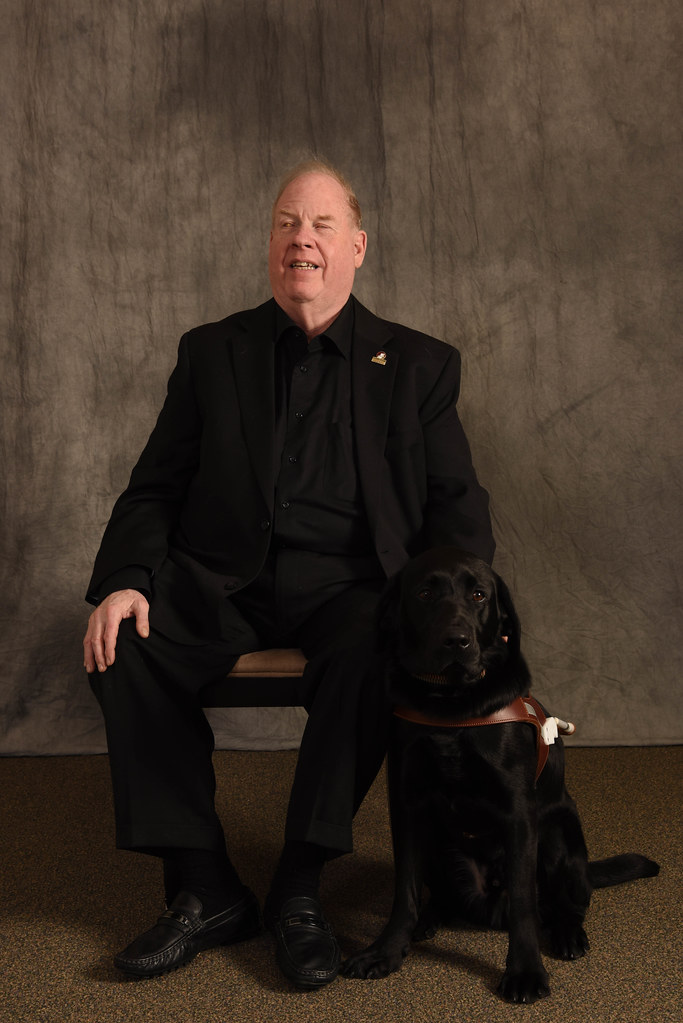
Michael Hingson is a keynote speaker, bestselling author of Thunder Dog, and a survivor of the September 11 World Trade Center attacks. Blind since birth, he brings a powerful and unique perspective on leadership, trust, and resilience in times of uncertainty.
He has spoken to organizations around the world, helping leaders and teams navigate change, build trust, and perform under pressure. His message combines real-world experience with practical insight that audiences remember long after the event ends.
👉 Book Michael Hingson for your next event.